SER65070 - Battery-powered transmitter
Product Description
The non-rechargeable battery-powered transmitter is a module designed to convert local commands into Bluetooth Mesh radio commands.
It is installed behind a wall switch (or via dedicated inputs) and, depending on the configuration chosen in the mobile App, lets you control a variety of equipment and use cases: On/Off, dimming, shutters (roller shutters/awnings…), PV/GV ventilation, chime, or pilot-wire heating.
The module can also be configured for input functions such as:
two-way switch / push-button (1 or 2 buttons),
3-button shutter switch,
motion detector,
Pilot Wire input.
Integrated into Bluetooth Mesh in Low Power mode, it also includes the range’s general functions: status LEDs, Reset button, wake-up via button combination, battery management, product life indication, update via the app, and integration with scenarios / Vigilant Home.
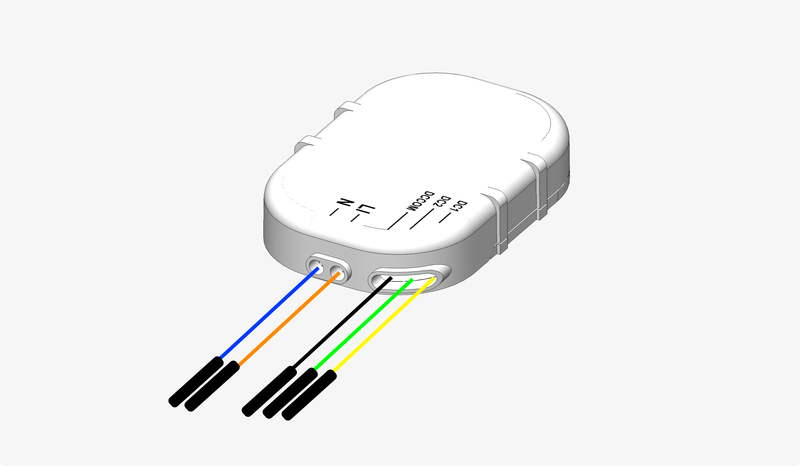
Item code : SER65070
Internal ref. : REF01
Technical Specifications
Power supply: CR2430 non-rechargeable battery
Connectivity: Bluetooth Mesh
Dimensions:
Operating temperature: 10°C - 60°C
Mounting: Fits inside a recessed box behind a fixture
Supported Functions
Control
 Lighting and socket management : Dimmer push-button · Motion detection · On/Off switch
 Ventilation control : Ventilation control · Ventilation control

Automation
Vigilant Home · Scenario management
Security
Standard range functions
Product interfaces · Power supplies · Product health indication · User account · Software updates · Bluetooth Mesh connectivity functions
Electrical Installation
Interfaces
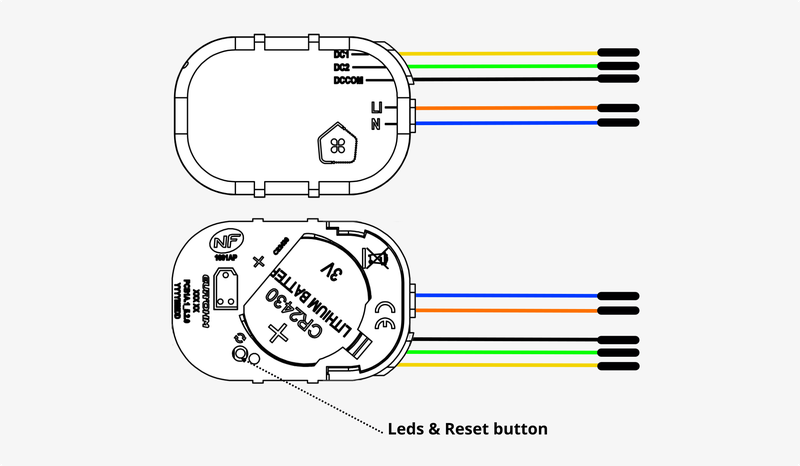
Powering up and connecting I/Os
Input wiring 1-button/rocker switch
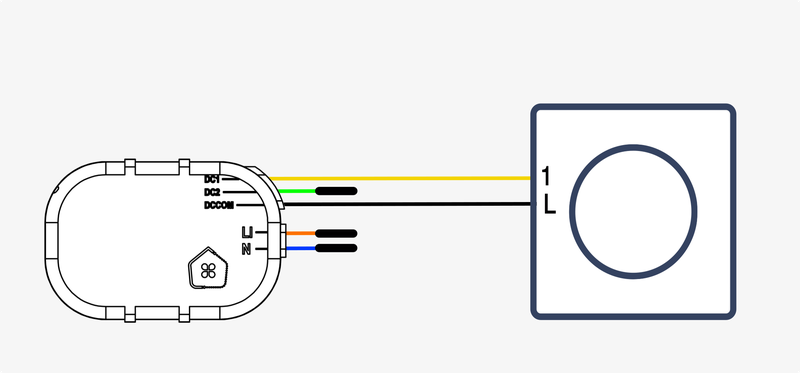
If the selected switch is a two-way switch, you can choose an assignment for the input from the following list:
If the switch is a push button, you can choose an assignment for the input from the following list:
Input wiring 2-button/rocker switch
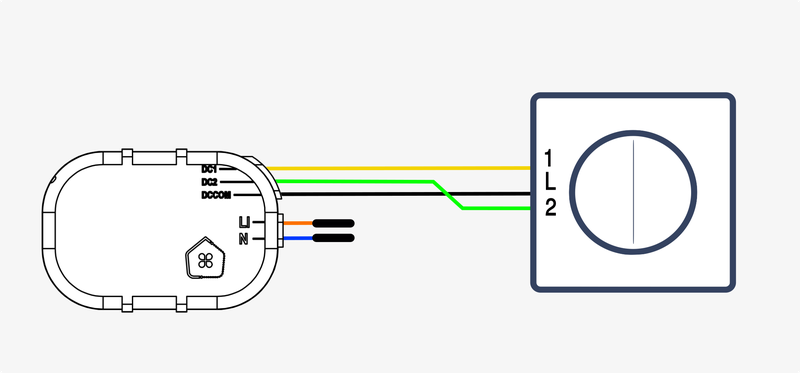
If the selected switch is a two-way switch, you can choose an assignment for the input from the following list:
- Lighting and socket management - On/Off switch (1 button required)
- Ventilation control - Ventilation control (1 button required)
- Ventilation control - Ventilation control (2 buttons required)
If the switch is a push button, you can choose an assignment for the input from the following list:
- Lighting and socket management - On/Off switch (1 button required)
- Lighting and socket management - Dimmer push-button (1 button required)
 Doorbell and chime - Doorbell and chime (1 button required)
 Shutter management - Shutter switches (2 buttons required)
 Scenario management - Scenario trigger button (1 button required)
Input wiring 3-button switch

If the selected switch is a two-way switch, you can choose an assignment for the input from the following list:
- Shutter management - Shutter switches (2 buttons required)
If the switch is a push button, you can choose an assignment for the input from the following list:
- Shutter management - Shutter switches (2 buttons required)
Input wiring Motion detector
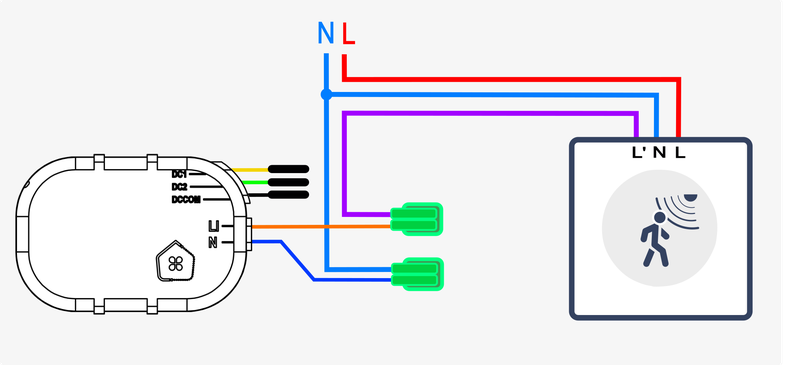
Automatic input assignment :
Input wiring Pilot wire input

Automatic input assignment :
Functional Setup
Once the product is electrically installed, you can power it on.
You can then start the functional setup from the mobile App.
Revision date : Oct 13, 2026