SER65085 - Emetteur Radio Linky
Product Description
The Linky Radio Transmitter is a complementary device to the Linky communicating meter, designed to transmit electricity consumption data in real time to third-party equipment, such as home automation systems, remote displays or energy managers. It enables local use of consumption data, without going through the external telecommunications network.
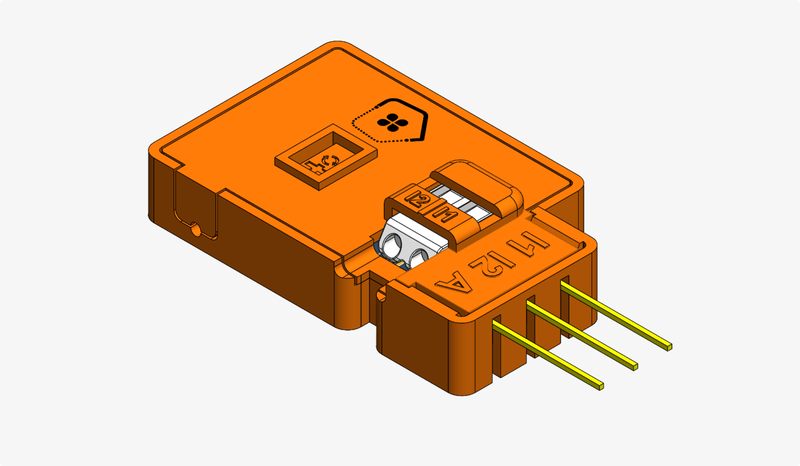
Item code : SER65085
Internal ref. : REF60
Technical Specifications
Power supply: LINKY TIC output
Connectivity: Bluetooth Mesh
Dimensions: PCB: 43x21x4mm ; Connector 16x10mm
Operating temperature:
Mounting: Fits inside the LINKY TIC input
Supported Functions
Energy & Sensors
Smart meter · Measurements and sensors · Electrical flexibility management
Standard range functions
Product interfaces (Product state indication by LEDs: adapted — see Usage) · Bluetooth Mesh connectivity functions · Product health indication · User account
Usage
Indicator light
The Linky Radio Transmitter has a single three-colour LED. It carries two indications:
during configuration mode and the installation or reset sequences, the status indication common to the range (Product state indication by LEDs), on the same LED;
the rest of the time, the “Metering Link Status” indicator of the Linky Ready standard (Enedis, § 9.4): it shows the reception of the customer tele-information (TIC) frames.
LED |
Meaning |
|---|---|
Blue, 0.1 s flash every 3 s |
TIC frames received and correct. |
Blue, 0.1 s flash every second |
TIC frames erroneous or missing: check that the product is fully inserted in the meter’s TIC socket. |
Green or red |
Configuration mode, installation or reset: see Product state indication by LEDs. |
Off |
Product out of service or not powered. |
📋 Requirement: During configuration mode and during the installation and reset flashes, the LED follows the range status indication, whatever the TIC reception.
📋 Requirement (replaces Product state indication by LEDs): When configuration mode ends, the LED resumes the TIC indication from the next frame.
📋 Requirement: When the TIC frames are correct, the LED blinks blue: 0.1 s on (−0 / +0.1 s), 2.9 s off (± 0.1 s).
📋 Requirement: When the TIC frames have been erroneous or missing for 5 s, the LED blinks blue: 0.1 s on (−0 / +0.1 s), 0.9 s off (± 0.1 s).
Reading the Linky meter
The Linky Radio Transmitter plugs into the customer tele-information (TIC) socket of the Linky meter and reads the frames the meter continuously sends on it. It derives from them the data of the Smart meter function, listed below with where to find them.
The TIC socket mode, historic or standard, is set at the meter by the distribution system operator.
Information read |
Where to find it |
TIC mode |
|---|---|---|
Household instantaneous power |
Product page, refreshed every 10 s |
historic and standard |
Consumption (meter index) |
Day, month and year history in the Mobile App, with a gateway |
historic and standard |
Current tariff period (off-peak or peak hours) |
Product page; off-peak control of loads, see Off-peak control |
historic and standard |
Tariff contract name |
Product settings page |
historic and standard |
Subscribed power |
Product settings page |
historic and standard |
Single-phase or three-phase installation |
Product settings page |
historic and standard |
Consumption or production |
Product settings page |
standard; in historic mode, the meter is in consumption |
Meter date and time |
Measurement timestamps |
standard; in historic mode, time comes from the mesh network |
📋 Requirement: The product reads the TIC in historic mode as well as in standard mode, on a single-phase as well as a three-phase installation, with no setting.
Electrical Installation
Interfaces
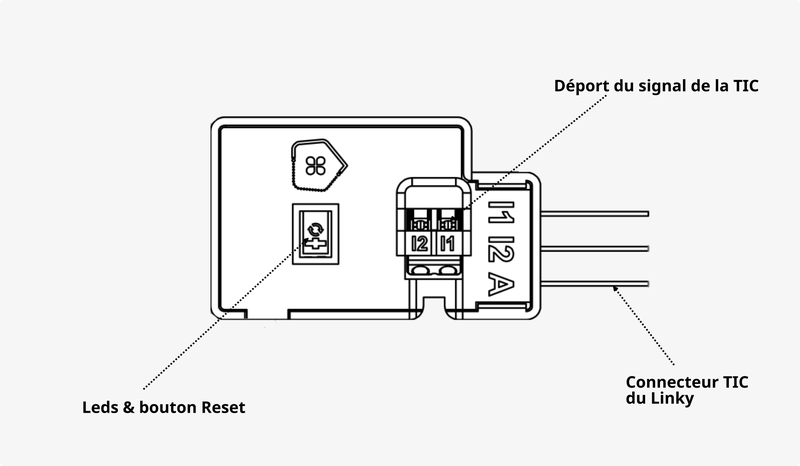
Connection to the meter’s TIC socket
Locate the Linky meter. It is usually in the household entrance, in a technical room or in an electrical cupboard.
Identify the TIC socket. The customer tele-information socket is on the front of the Linky, often under a small cover or marked by a pictogram.
Plug in the Linky Radio Transmitter. Remove the TIC socket cover if there is one, then insert the product connector up to the stop. The housing holds in place with no play.
Check frame reception. The product is powered by the meter. The LED blinks blue as soon as TIC frames are received: see Usage.
📋 Requirement: The product draws all its power from the meter’s TIC socket.
Functional Setup
Once the product is electrically installed, you can power it on.
You can then start the functional setup from the mobile App.
Revision date : Oct 13, 2026