SER65072 - Micromodule On/Off et Variation without neutral
Product Description
The dimming micro-module with or without neutral is a recessed module, mains-powered, designed to control lighting and sockets within the Bluetooth Mesh ecosystem.
Depending on the configuration chosen in the mobile App, it can perform dimming control functions (with calibration), or motion detection.
The product includes all of the range’s general functions:
With or without Neutral power supply
Status LEDs and Reset button
Energy consumption metering
Safety functions: overheat alert, power outage alert, zero-load detection
Full Bluetooth Mesh connectivity (provisioning / unprovisioning, configuration mode, Proxy, Relay and Friend roles)
Scenarios, Vigilant Home and voice assistant compatibility
Software update via the mobile Application
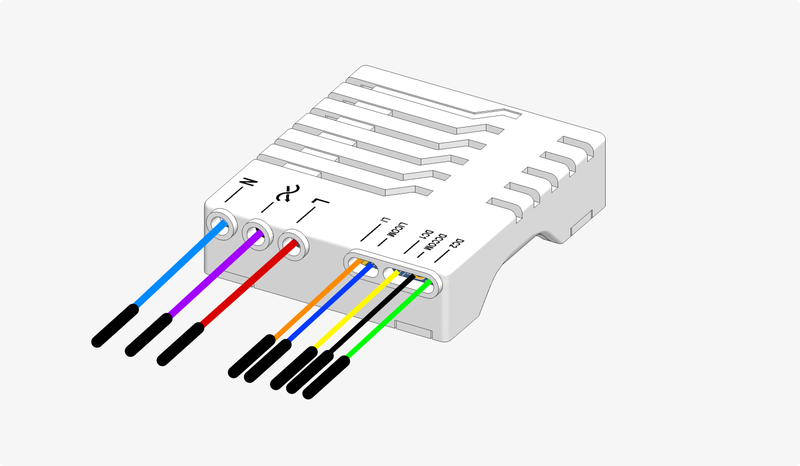
Item code : SER65072
Internal ref. : REF10
Technical Specifications
Power supply: 230V AC ~50Hz
Connectivity: Bluetooth Mesh
Dimensions: 42x35x10mm
Output: 100-230V AC 5A
Operating temperature: 10°C - 60°C
Mounting: Fits inside a recessed box (with mounting sleeve)
Maximum load limits
Load type |
Wiring |
Min power |
Max power |
Max current |
Per output |
|---|---|---|---|---|---|
Halogen |
No neutral (2-wire) |
5W |
200W |
||
Halogen |
With neutral (3-wire) |
200W |
|||
LED |
No neutral (2-wire) |
5VA |
100VA |
||
LED |
With neutral (3-wire) |
100VA |
Supported Functions
Control
 Lighting and socket management : Dimming output · Dimmer push-button · Motion detection · On/Off switch
Automation
Scenario management · Vigilant Home
Energy & Sensors
Energy consumption measurement · Off-peak control
Security
Overheat alert · Power outage alert · Zero-load detection
Standard range functions
Product interfaces · Power supplies · Product health indication · User account · Software updates · Bluetooth Mesh connectivity functions · Voice assistant compatibility
Electrical Installation
Interfaces
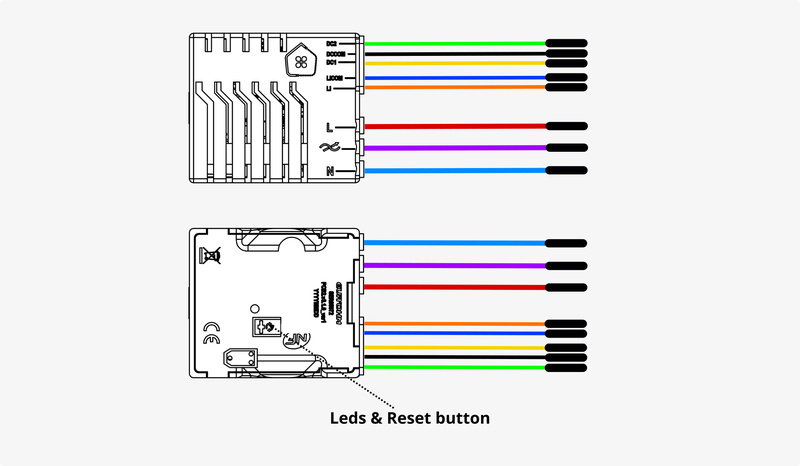
Mains connection
Warning
!! ELECTROCUTION HAZARD !! Before wiring this product, carefully read this warning: Electrocution Hazard
Input wiring 1-button/rocker switch
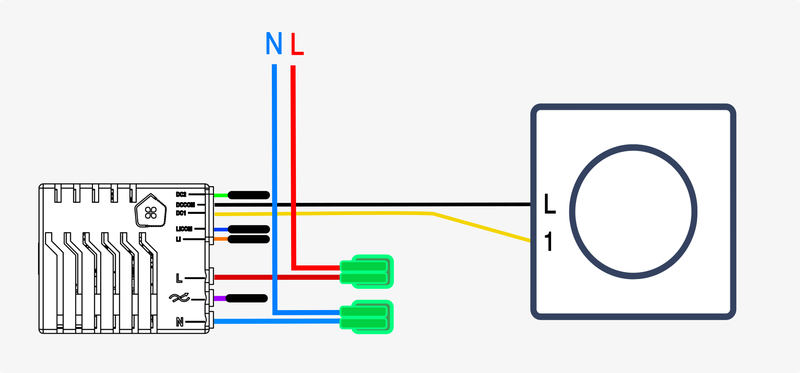
If the selected switch is a two-way switch, you can choose an assignment for the input from the following list:
If the switch is a push button, you can choose an assignment for the input from the following list:
Input wiring 2-button/rocker switch
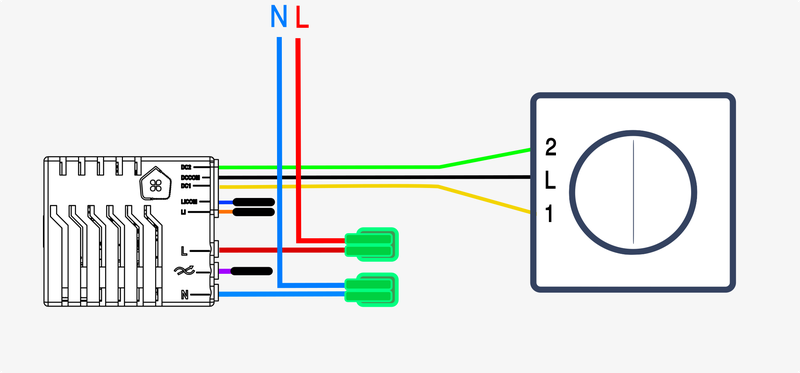
If the selected switch is a two-way switch, you can choose an assignment for the input from the following list:
- Lighting and socket management - On/Off switch (1 button required)
If the switch is a push button, you can choose an assignment for the input from the following list:
- Lighting and socket management - On/Off switch (1 button required)
- Lighting and socket management - Dimmer push-button (1 button required)
 Scenario management - Scenario trigger button (1 button required)
Input wiring Motion detector
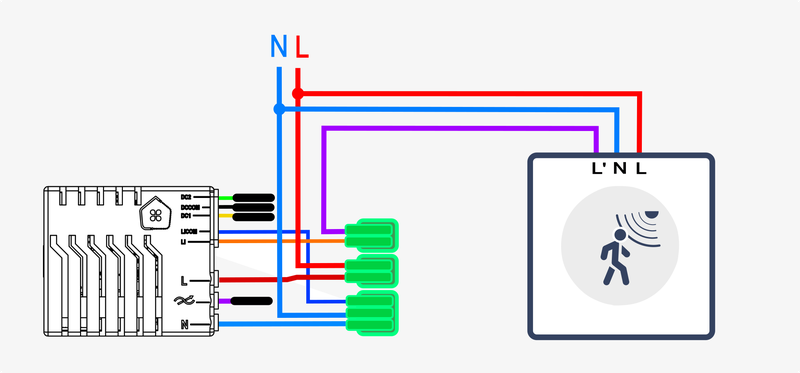
Automatic input assignment :
Output wiring On/Off (light bulb)
Avec Neutre :

Sans Neutre :

Output assignment :
Output wiring Dimming
Avec Neutre :
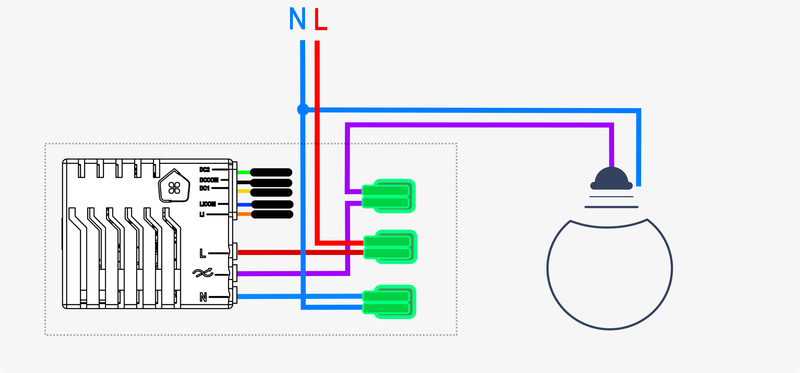
Sans Neutre :
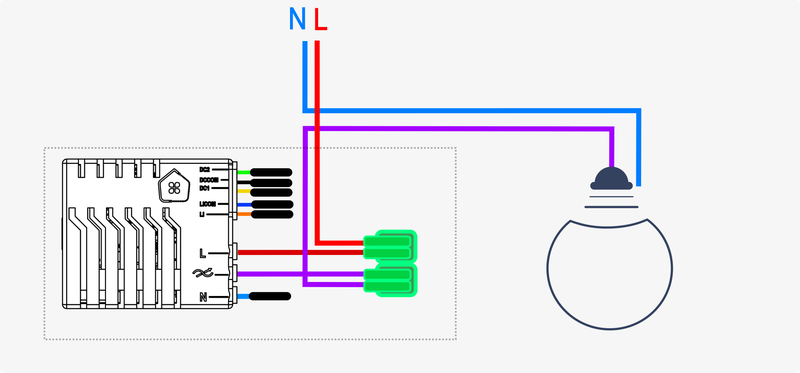
Output assignment :
Functional Setup
Once the product is electrically installed, you can power it on.
You can then start the functional setup from the mobile App.
Revision date : Oct 13, 2026